> ## Documentation Index
> Fetch the complete documentation index at: https://blog.gputrader.io/llms.txt
> Use this file to discover all available pages before exploring further.
# Introducing the GPU Trader API
> Programmatic Access to GPU Trader
**Published:** April 16, 2025
**Author:** Chris Chiappone
**Read Time:** 4 Minutes
 We’re excited to launch the **GPU Trader API**, giving you direct, programmatic access to enterprise-grade GPU environments—no console clicks required.
Whether you're automating infrastructure, integrating GPU selection into internal tools, or just tired of navigating UIs, the API gives you powerful control to **search, filter, and manage environments on your terms**.
## What you can do today
The initial release includes:
* **Querying available environments** by specs, price, and availability
* **Fetching real-time listing status** for any environment
* **Favoriting environments** to manage preferred configurations
* **Early support for automation workflows** (with full provisioning APIs coming soon)
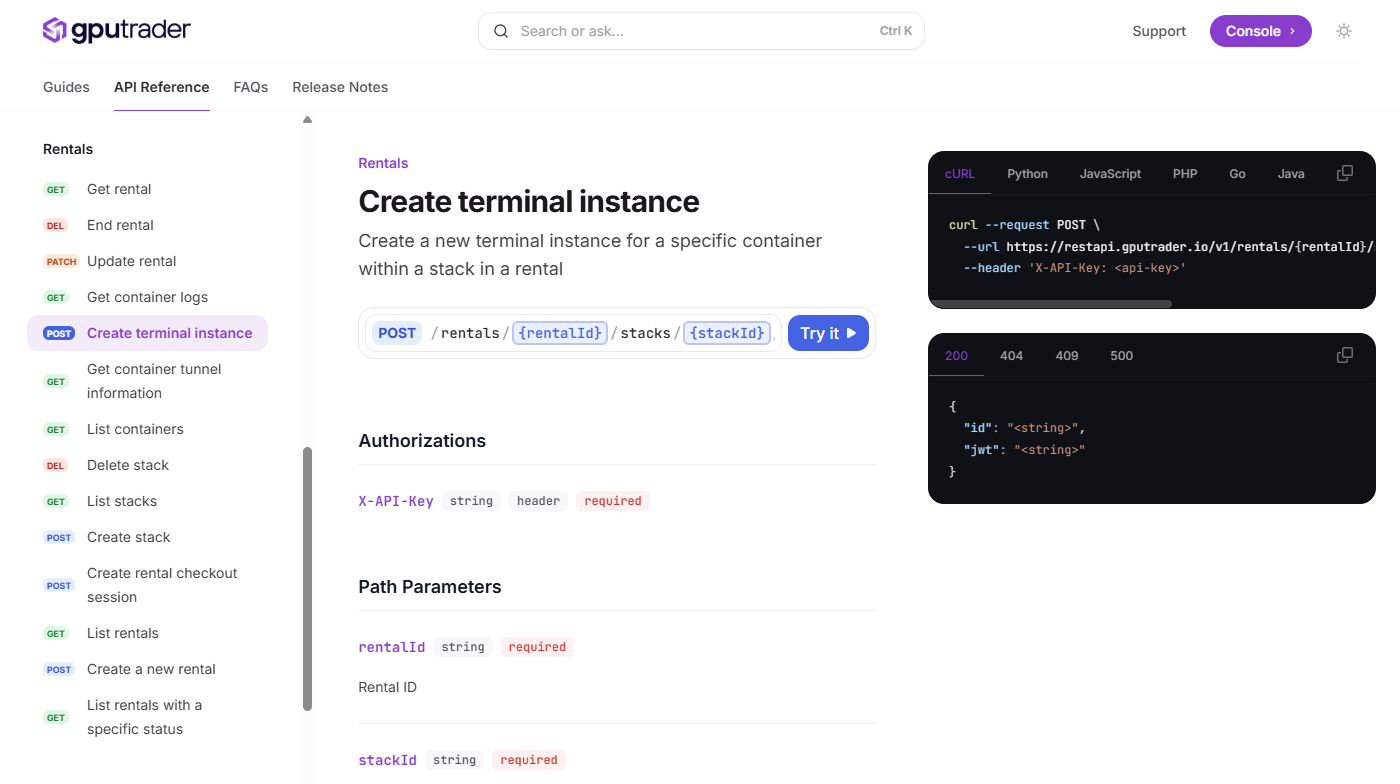
Example from our API reference:
```
POST /rentals/{rentalId}/stacks/{stackId}/containers/{containerId}/terminal
```
This creates a new terminal instance for a specific container within a stack in a GPU Trader rental.
## Built for developers
If you’ve ever wanted to integrate your orchestration layer, spin up GPUs based on demand triggers, or pre-filter hardware by card type or location, this is your starting point.
We built the API with dev teams in mind. It’s fast, lightweight, and documented at [docs.gputrader.io](https://docs.gputrader.io/api-reference).
## How to Get Started
[docs.gputrader.io/api-reference](https://docs.gputrader.io/api-reference/introduction)
You will need to add payment information if you want to do more than test the API and rent instances.
Use [docs.gputrader.io/api-reference](https://docs.gputrader.io/api-reference) to test before you integrate.
As we add endpoints, stay up to date in our API [release notes](https://docs.gputrader.io/release-notes/api).
## Your compute, your control
This API is just the start. If you’ve been looking for a way to work directly with high-end GPU infrastructure without middle layers getting in the way, we’re building exactly that.
And if there's an endpoint you wish existed, tell us. We’re listening.
We’re excited to launch the **GPU Trader API**, giving you direct, programmatic access to enterprise-grade GPU environments—no console clicks required.
Whether you're automating infrastructure, integrating GPU selection into internal tools, or just tired of navigating UIs, the API gives you powerful control to **search, filter, and manage environments on your terms**.
## What you can do today
The initial release includes:
* **Querying available environments** by specs, price, and availability
* **Fetching real-time listing status** for any environment
* **Favoriting environments** to manage preferred configurations
* **Early support for automation workflows** (with full provisioning APIs coming soon)
Example from our API reference:
```
POST /rentals/{rentalId}/stacks/{stackId}/containers/{containerId}/terminal
```
This creates a new terminal instance for a specific container within a stack in a GPU Trader rental.
## Built for developers
If you’ve ever wanted to integrate your orchestration layer, spin up GPUs based on demand triggers, or pre-filter hardware by card type or location, this is your starting point.
We built the API with dev teams in mind. It’s fast, lightweight, and documented at [docs.gputrader.io](https://docs.gputrader.io/api-reference).
## How to Get Started
[docs.gputrader.io/api-reference](https://docs.gputrader.io/api-reference/introduction)
You will need to add payment information if you want to do more than test the API and rent instances.
Use [docs.gputrader.io/api-reference](https://docs.gputrader.io/api-reference) to test before you integrate.
As we add endpoints, stay up to date in our API [release notes](https://docs.gputrader.io/release-notes/api).
## Your compute, your control
This API is just the start. If you’ve been looking for a way to work directly with high-end GPU infrastructure without middle layers getting in the way, we’re building exactly that.
And if there's an endpoint you wish existed, tell us. We’re listening.